Notifications
Which emails MonoAdmin sends you, how to switch product news off, how to get Discord messages for account and project events, and when they arrive.
On This Page
MonoAdmin tells you about what concerns you in two ways. Service email is always on, and Product News is the one email you can switch off. Discord messages are optional: direct messages from the MonoAdmin bot, for people who linked their Discord account. Notifications belong to your account, not to a project, so one set of choices covers every project you own or work in. Open them with Account > Notifications.
There is no notification inbox in the panel. Inside the panel you only see short toasts after an action, the count of open reports and a few banners, such as when your server has more players online than your plan allows.
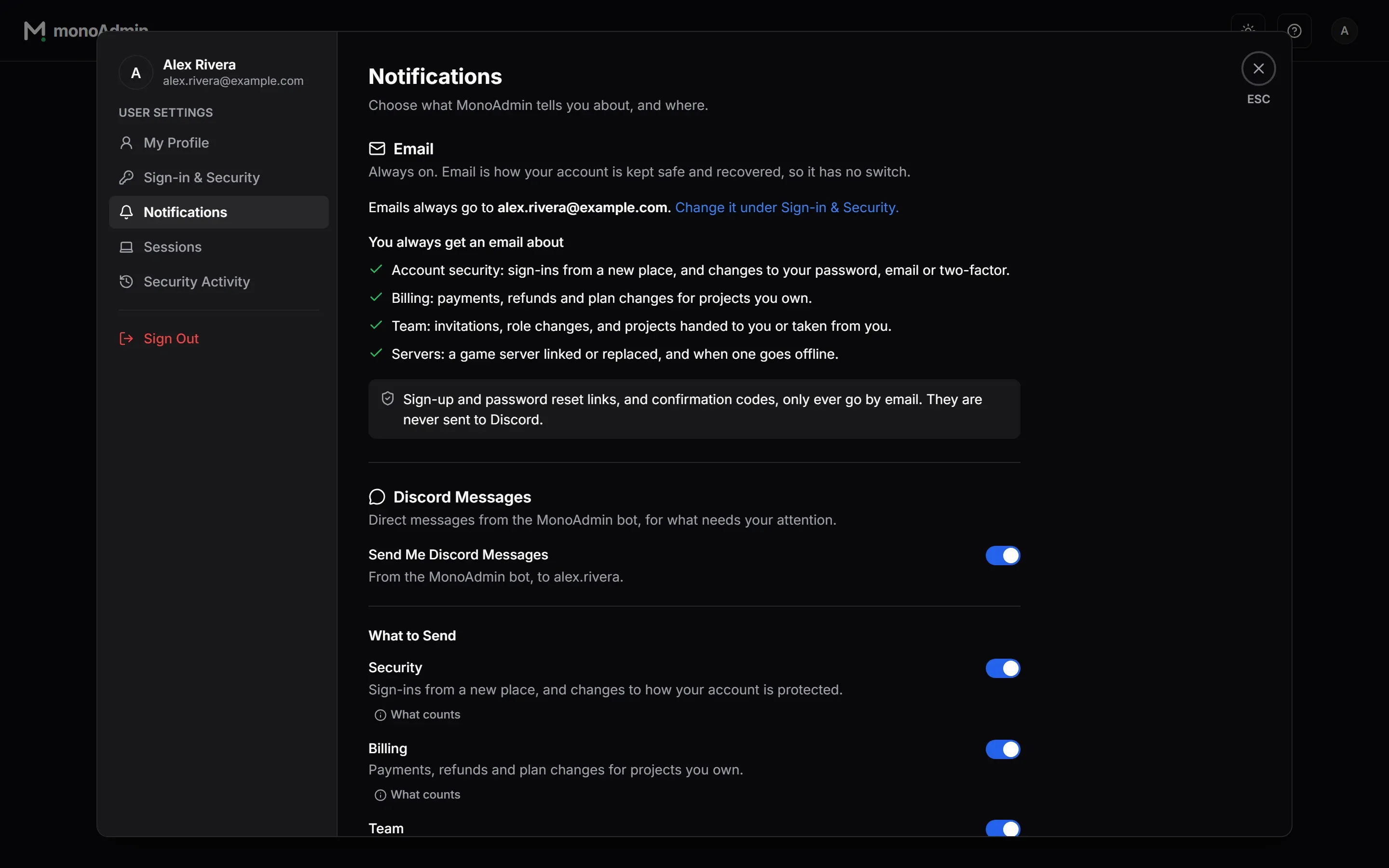
Service email has no switch. It is how your account is kept safe and recovered, so it is always on, and it goes to the address on your account (“Emails always go to {email}.”). Change that address under Sign-in & Security, as described on Profile and Sign-In. The one email you can switch off is Product News.
You always get a service email about:
- Account security. A sign-in from a new place, a changed password, email address or two-factor setting, wrong two-factor codes after a correct password, and a game account linked to you.
- Billing. For projects you own: a payment received, failed or refunded, a plan about to end and a plan that has ended.
- Team. An invitation to a project, someone accepting yours, your role changing, being removed from a project, and a project handed to you or taken from you.
- Servers. For projects you own: a game server linked, a server link used from another address, a server going offline and coming back.
Some mail only ever goes by email and is never sent to Discord, because it carries a link or code that works as a credential: sign-up confirmation, password reset links, email-change codes, project deletion codes and project invitations. When you change your email address, the notice goes to the old address.
Product News
The Email card has one switch, Product News: “Occasional emails about new features and offers. On unless you turn it off.” It is on for every account, accounts that already existed included, and it saves the moment you flip it. Product news comes from news@monoadmin.net and is never an account, billing or server notice, so turning it off changes none of the emails listed above.
Every product news email ends with an Unsubscribe link, and the email’s own header offers the unsubscribe button some mail apps show. The link opens a page that asks “Stop MonoAdmin news to {email}?” with the middle of the address hidden. Opening the link changes nothing: only the Unsubscribe button does, so a mail scanner that opens links cannot unsubscribe you by accident. Then:
- Product news stops for that address. If it is the address of your account, the Product News switch turns off too, and you can turn it back on in Account > Notifications.
- Only product news stops. Emails about accounts, billing and servers still arrive.
- The link works for a year after the email was sent. After that, use the link in a newer email, or the switch if you have an account.
MonoAdmin also sends product news to a mailing list of customers of the earlier MonoAdmin service, who need not have an account. They have no switch: the unsubscribe link is how they stop it. The Privacy Policy says what is kept about them.
Discord Messages
The Discord Messages card sends the same kinds of notice to your Discord direct messages, so you see them without checking your inbox. A direct message never contains a link with a token or a code.
You need two things. This MonoAdmin must have its Discord bot set up, and your account must have Discord linked under Sign-in & Security. Until then the card says “Discord messages are not set up on this MonoAdmin, so everything arrives by email.” or “Link your Discord account to also get these messages in Discord.” with a Link Discord button.
The Master Switch
Send Me Discord Messages turns the whole channel on or off, and it is on once you link Discord. When it is off, the card says “Discord messages are off, so nothing below is sent. Emails are not affected.” Every switch on this card saves the moment you flip it.
Topics
Below the master switch are seven topics. A What counts chip on each row lists the events, and the Off by default badge marks the two that start off.
| Topic | What it covers | Default | Also by email |
|---|---|---|---|
| Security | A new sign-in, a changed password or email, two-factor turned on or off or locked, a game account linked to you. | On | Yes |
| Billing | Payments received or failed, refunds, a plan about to end, a plan that has ended. For projects you own. | On | Yes |
| Team | An invitation waiting for you, someone accepting yours, your role changing, being removed from a project, a project handed to you or taken from you. | On | Yes |
| Servers | A game server linked or replaced, gone offline or back online. For projects you own. | On | Yes |
| Reports Assigned to Me | Someone else assigns a report to you. | On | No |
| Every New Report | Each new report in a project where you can manage reports. | Off | No |
| Every New Whitelist Request | Each new whitelist request and each new application in a project where you can manage the whitelist. | Off | No |
Reports Assigned to Me does not message you when you assign a report to yourself, which includes claiming it from Discord or in game.
Every New Report is off by default because a busy server can file a lot of reports. When you turn it on, you get at most one message every 10 minutes for each project, and none for reports you filed yourself. It only covers projects where you own the project or your role includes Manage Reports. Reports covers handling them.
Every New Whitelist Request is off by default too. When you turn it on, you hear about a player’s new whitelist request and about each new application, in projects where you own the project or your role includes Manage Whitelist. New requests are limited to one message every 10 minutes for each project. Whitelist explains requests and applications.
When Messages Arrive
Emails and Discord messages are queued the moment the event happens and sent within seconds. Some events wait on purpose, so one outage does not become a stream of messages.
| Event | When you hear |
|---|---|
| Server offline | After the server has been disconnected for 5 minutes, so a restart does not count. Not sent if the outage is already more than an hour old when MonoAdmin notices it. At most one notice an hour for a project. |
| Server back online | Once the server has stayed connected for a full minute. |
| Server link used from another address | At most once an hour for a project. |
| Plan ending soon | About 3 days before a paid plan ends, once for each paid period, and only when nothing will renew it. |
| Every new report | At most one every 10 minutes for each project. |
| A new whitelist request | At most one every 10 minutes for each project. |
A Discord message that cannot be delivered is retried, but one that has waited more than 12 hours is dropped, because an offline notice that arrives the next morning is not news.
When Messages Stop
Discord only lets the MonoAdmin bot message you when both of these are true: you are in a Discord server that the bot is also in, and that server allows direct messages from its members. If Discord refuses a message, MonoAdmin stops sending until a test message gets through, so it does not keep knocking.
The Delivery section on the card shows where you stand:
- “Messages are reaching you. The last one arrived on {time}.”
- “No message has been sent yet. Send a test message to check that they reach you.”
- Discord Is Not Letting Messages Through, with the time of the first refusal and the two conditions above. To fix the second one, open the server menu in Discord, choose Privacy Settings and turn on Direct Messages. If you share no server with the bot, the card links the MonoAdmin community server when one is set up.
Choose Send Test Message to check delivery. The toast says “Test message sent. Check your Discord messages.” or “Discord did not deliver the test message”. A test that gets through lifts the block. You can send up to 5 tests in 10 minutes.
Nothing is sent to Discord when the master switch or the topic is off, when Discord is unlinked, or, for report messages, once you are no longer on the project’s staff. Email is never affected by any of this.