Webhooks
Send log lines from your own scripts to MonoAdmin with a webhook URL, in MonoAdmin's JSON format or the Discord webhook format.
On This Page
A webhook is a URL that your scripts, or any other tool, can post log lines to. MonoAdmin keeps the lines, makes them searchable and shows them live, and every line also appears in Server Logs next to the rest of what happened on your server. Use one for the things only your own scripts know about: robberies, purchases, admin commands, anything you would otherwise post to a Discord channel. Scripts that already log to a Discord webhook only need their URL swapped.
Webhooks in MonoAdmin are inbound only. MonoAdmin never calls your URLs and never sends anything to Discord or anywhere else through them. There are no outgoing webhooks, no signatures and no API keys: the secret inside the URL is the only credential.
Who Can Use Them
Webhooks are under Settings > Webhooks. Two permissions apply:
- Manage Webhooks opens the page and creates, edits, rotates, tests and deletes webhooks.
- View Server Logs shows what a webhook received: its live tail and its delivery log, and the same lines in Server Logs. There is no separate permission for webhook logs.
The default Admin role has both. Moderator has View Server Logs only, so it reads webhook lines in Server Logs but does not see the Webhooks page. Support has neither. A project can have up to 20 webhooks.
A role with only Manage Webhooks sees the webhook but not what it receives: “Your role can manage this webhook but not see what it receives. To see the live tail and the delivery log, ask the project owner to add View Server Logs to your role.” If Server Logs is switched off for the project, the note says that instead: “Server Logs is switched off in Settings > Features, and what a webhook receives is read there. Turn Server Logs on to see the live tail and the delivery log.” A feature that is off is off for everyone, so while Server Logs is off nobody can read what a webhook receives. The webhook keeps accepting and storing lines meanwhile.
Create a Webhook
- Press New Webhook.
- Enter a Name of up to 64 characters. Name it after what will post to it, for example “Bank robberies” or “Admin commands”.
- Set Lines per Minute: the most lines this webhook accepts. The default is 120, which suits most scripts, and the most you can set is 6,000. Lines beyond the limit are refused.
- Press Create Webhook.
You then see the webhook’s URL, together with a Discord-Compatible URL (the same address with /discord added). The panel says Copy the URL now: it is only shown once. MonoAdmin keeps only a fingerprint of the secret in the URL, so it cannot show it again. Afterwards the page shows only how the URL ends (“This webhook’s URL ends in …”), so you can tell URLs apart.
Send a Line
The webhook’s How to Send tab has copy-and-paste examples. In the examples, YOUR_WEBHOOK_URL stands for your webhook’s URL.
JSON
Post a JSON object with an event (what happened) and a message (the line to show). Any other fields are kept with it and can be searched.
{
  "event": "bank_robbery",
  "message": "Fleeca Bank on Route 68 is being robbed",
  "player": "Juno Vex",
  "amount": "25000"
}
From a terminal:
curl -X POST "YOUR_WEBHOOK_URL" \
  -H "Content-Type: application/json" \
  -d '{"event":"bank_robbery","message":"Fleeca Bank on Route 68 is being robbed","player":"Juno Vex","amount":"25000"}'
The event can be up to 64 characters and the message up to 4,000. Both are required. Up to 32 extra fields are kept, each up to 256 characters. Field names use letters, digits, _, . and -. A value that is not text is kept as written.
FiveM (Lua)
From a server script, post with PerformHttpRequest. Keep the URL in a server-side file.
PerformHttpRequest("YOUR_WEBHOOK_URL", function() end, "POST", json.encode({
  event = "bank_robbery",
  message = "Fleeca Bank on Route 68 is being robbed",
  player = GetPlayerName(source),
}), { ["Content-Type"] = "application/json" })
Use it inside an event handler or command where source is the player, or replace GetPlayerName(source) with the value you want to log.
Discord Form
Add /discord to the end of the URL and post a Discord webhook body: content, username and embeds. A script that already logs to a Discord webhook can swap its Discord URL for this one and keep the same body.
{
  "username": "Police MDT",
  "embeds": [
    {
      "title": "Arrest",
      "description": "Juno Vex was arrested at Legion Square",
      "color": 15158332,
      "fields": [{ "name": "Officer", "value": "Kiyoshi" }]
    }
  ]
}
MonoAdmin turns it into a line like this:
- The event is the
username, or the first embed’s title if there is no username, ordiscordif there is neither. - The message is the
content, or the titles and descriptions of the embeds if there is no content. The line needs one or the other. - Embed fields, the author name and the footer text are kept as fields. At most 10 embeds are read.
- The first embed’s color marks the line.
What the Answers Mean
A post is answered with an HTTP status. Check it in your script when a line seems to go missing.
| Status | Meaning |
|---|---|
| 204 | Accepted and kept. |
| 400 | The body is not a JSON object. |
| 422 | The event or the message is missing or empty. |
| 403 | The webhook is disabled, or webhooks are switched off for your project. |
| 404 | Wrong URL, or the URL was rotated or deleted. |
| 413 | The body is over 64 KB. |
| 429 | Too many lines; slow down and retry a little later. |
Watch Lines Arrive
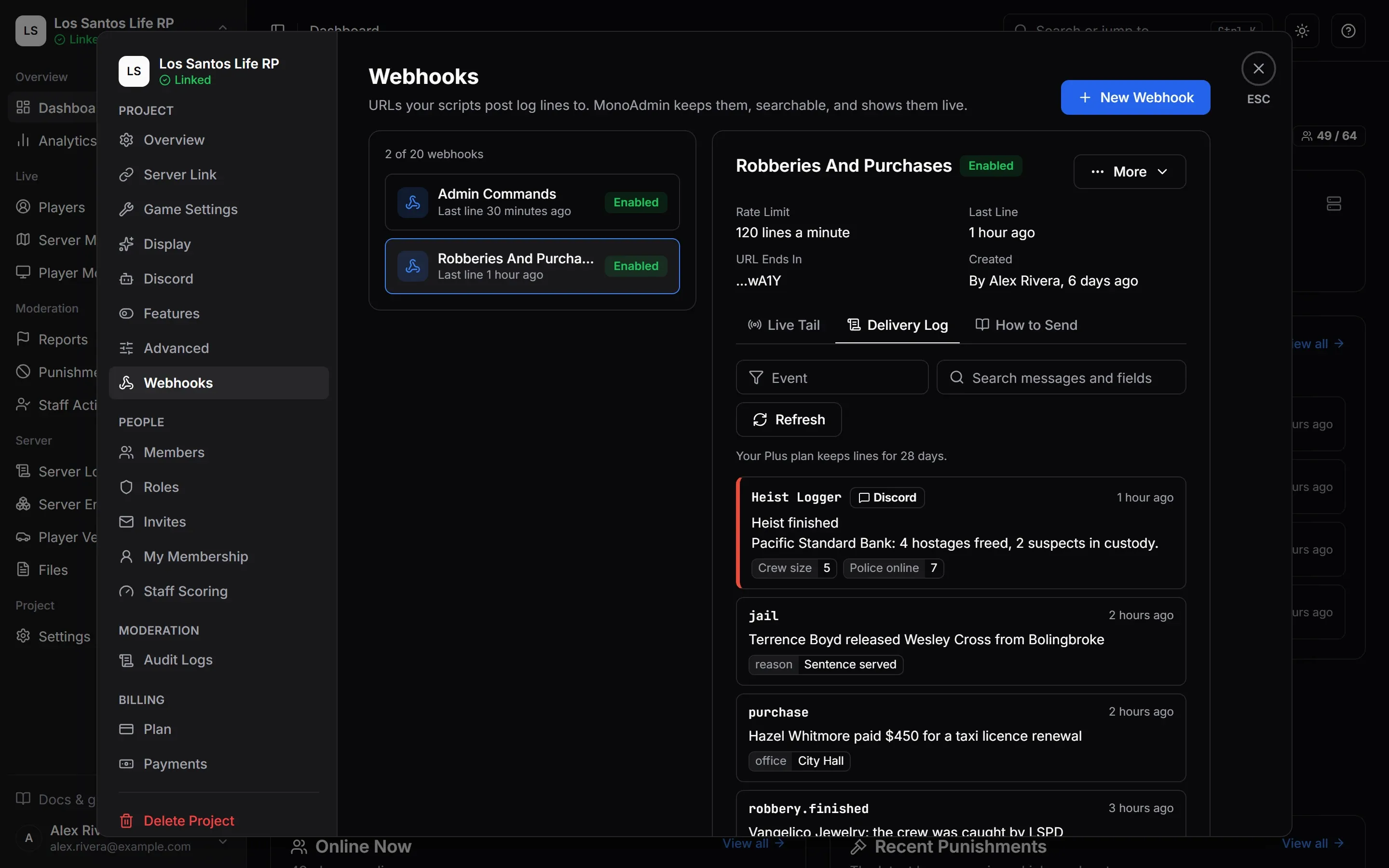
Open a webhook to see its tabs. The Live Tail and Delivery Log need View Server Logs.
- Live Tail shows lines the moment they arrive, while the page is open. Pause holds new lines back, Resume shows them and Clear empties the tail. It keeps the latest 200 lines.
- Delivery Log holds every line the webhook accepted, newest first. Search messages and fields looks in the message and the extra fields. The Event filter needs the exact event name. Lines are kept for your plan’s history (“Your {plan} plan keeps lines for {days}.”) and can take a few seconds to appear. See Plans and Limits.
- How to Send has the examples above, the limits and the answers.
Each line shows its event, message, the time it arrived, the format it came in (JSON or Discord) and its fields. Show More opens all of them.
Send Test posts a line with the event test and the message “Test delivery sent by {name}”. It lands in the Delivery Log and the Live Tail like a real line, but it does not go through the URL, so it does not prove the URL works. To check that, send a line yourself with curl or from your script. A disabled webhook takes no test. A role with Manage Webhooks but not View Server Logs can send a test but cannot see it; the panel says so.
Webhook Lines in Server Logs
Every line a webhook accepts is also copied to Server Logs, where it has the type Webhooks. The webhook keeps its own Live Tail and Delivery Log as well. Send Test lines are copied too.
A webhook line reads “{webhook} received {event}”, for example “Bank robberies received bank_robbery”. The message is under it as plain text, and a Discord embed’s color shows as a small color mark. The arrow on the line opens the rest: the fields your script sent and the Format it came in, JSON or Discord. If your role has Manage Webhooks, an Open Webhook link takes you to the webhook in Settings > Webhooks. The link is not shown in the in-game Web Panel, where settings are only in the browser. The line carries the webhook’s name from the moment it arrived, so renaming a webhook later does not change the lines already kept.
Search in Server Logs finds these lines by the webhook’s name, the event, the message and the field values. To jump to a webhook’s lines, open the webhook and choose Open in Server Logs (it needs View Server Logs). It opens Server Logs filtered to the type Webhooks and the webhook’s name.
What Server Logs Shortens
Server Logs keeps a shorter copy of each line than the webhook does:
- The message is cut at 512 bytes, each field value at 64 bytes and all the fields together at 2 KB. If the fields do not fit, some are left out.
- Line breaks become spaces.
- A byte is a character in plain English. Accented letters and other alphabets take more than one byte each, so less of them fits.
The Delivery Log keeps the whole line, up to the limits at the end of this page.
No Player on These Lines
A script can write any name, so MonoAdmin does not take a player from a webhook line. Webhook lines never appear on a player’s Logs tab, and they are hidden while Server Logs is filtered to a player. You can still find a line by a player’s name that the script put in a field or the message.
Turning the Copy Off
Server Logs has a Webhooks switch under Settings > Features. It is on by default, and changing it needs Edit Settings. With it off, or with Server Logs itself off, a webhook still accepts lines and keeps them in its Delivery Log, but nothing is copied to Server Logs. Lines that arrive meanwhile are not copied later when you switch it back on. See Features and Modules.
Server Logs also limits how fast a project can add lines, and webhook lines count with the rest. A line over that limit is still accepted, so the script gets 204, and it is kept in the Delivery Log, but it is not copied.
Server Logs follows your plan’s history like the Delivery Log does. See Plans and Limits.
Manage a Webhook
- Edit changes the name, Lines per Minute and Accept lines. The change applies to the next line. The URL stays the same.
- Disable (under More) makes the webhook refuse every line until you Enable it again. Posts get an error and nothing is kept. The URL stays the same.
- Rotate URL creates a new URL. The old one stops working right away, scripts using it get an error until you give them the new one, and the delivery log is kept. The new URL is shown once, like the first.
- Delete removes the webhook, its URL, its whole delivery log and its lines in Server Logs. This cannot be undone. The lines leave Server Logs in the background, so they can take a short while to disappear.
Creating, changing, rotating and deleting a webhook are recorded in Audit Logs. The URL itself is never recorded.
Limits at a Glance
| Limit | Value |
|---|---|
| Webhooks per project | 20 |
| Lines per minute, per webhook | 120 by default, up to 6,000 |
| Body size | 64 KB |
| Event | 64 characters |
| Message | 4,000 characters |
| Extra fields | 32, each up to 256 characters |
| Message copied to Server Logs | 512 bytes |
| Field value copied to Server Logs | 64 bytes |
| All fields copied to Server Logs | 2 KB |
| How long lines can be read | Your plan’s history |