Plans and Limits
What each MonoAdmin plan allows: players online, roles, staff seats, monitor slots, map refresh and history.
On This Page
Every project starts on the free Starter plan, which has no end date and needs no payment. Paid plans raise six limits: players online, roles, staff seats, Player Monitor slots, map refresh speed and how much history you can see. Nothing else is gated by plan. Every feature of the panel works on Starter, your own Discord bot for Discord Tickets included.
One paid plan works differently from the rest: Lifetime is a single payment for one project, with the same limits as Enterprise, and it never ends. See Lifetime below.
The numbers for each plan are in the table at the bottom of this page, and prices are on the Pricing page. The table is what MonoAdmin enforces. This page explains what each limit means and what happens when you reach it.
Where You See Your Plan
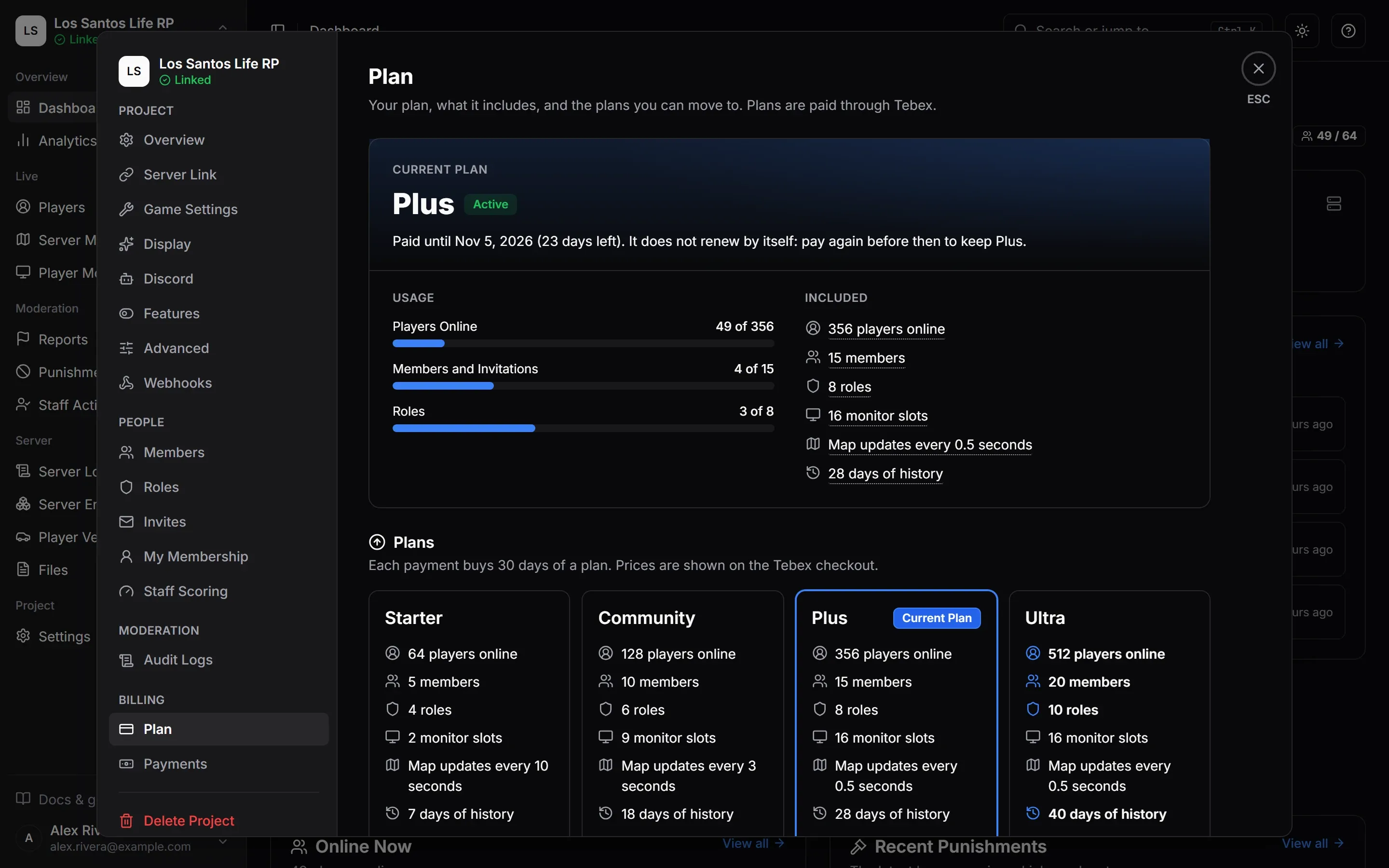
The project owner opens Settings > Plan. Other members see a summary on Settings > Overview that says “Only the project owner can change it.”
- Current Plan shows the plan, its status and, for a paid plan that has an end, the date it runs until. Statuses are Free, Active, Renews Automatically, Ends Soon, Payment Problem and Paid Plan Ended, and for Lifetime Paid Once and Payment Disputed. When a Plan Ends or Runs Over explains each.
- Usage has meters for Players Online, Members and Invitations and Roles, each as “{used} of {limit}”. A meter that is past its limit says Over the limit.
- Plans puts every plan side by side, with the values that are better than yours in bold. Lifetime’s row says “One payment · never ends” instead of a billing period, and reads “Yours for good” once the project has it. While your server has more players online than your plan allows, the smallest plan above yours that covers them carries a Fits Your Server badge.
- When a Plan Ends summarises what happens when a paid plan runs out.
Buying and renewing are covered on Paying and Renewing.
Lifetime
Lifetime is one payment for one project. It has the same limits as Enterprise, for as long as MonoAdmin runs, and it has no end date: there is nothing to renew and no subscription to keep. The Plan screen shows the status Paid Once and says “Paid once, with no end date.” Buying and refunds are covered on Paying and Renewing.
- It belongs to one project. The payment stays with the project it was made for. Another project needs its own plan.
- Nothing lowers it. While a project has Lifetime, a subscription that renews, a subscription that ends or a payment for another plan does not change the plan. Payments are still recorded under Settings > Payments.
- It ends only with its payment. If the Lifetime payment is refunded, or a dispute over it is lost, the project moves to its best subscription that still runs, or to Starter. While a dispute is open, the plan stays and the status reads Payment Disputed.
- There is nothing more to buy. The Plan screen shows “This project has Lifetime, so there is nothing more to buy.” and checkout is refused for every plan.
- A subscription has to go first. Buying Lifetime while a subscription is active is refused: cancel the subscription on Tebex, then buy.
What Each Limit Means
Players Online
This is how many players MonoAdmin tracks at the same time. It counts players on your server right now, not everyone who ever joined. Below the limit everything works as normal.
Above it, your server keeps running and nobody is turned away. MonoAdmin stops tracking the players over the limit, so they are not listed and cannot be acted on, and most pages lock until the count drops: only the Dashboard and Settings stay open. Upgrading unlocks everything as soon as the payment is confirmed. The details are on When a Plan Ends or Runs Over.
Roles
This is how many staff roles the project can define. The three roles every project starts with, Admin, Moderator and Support, count towards it. When all your roles are used, New Role is refused with “Your plan’s role limit is reached. Upgrade the plan or delete a role to add another.” A role can only be deleted once it has no members. See Roles and Permissions.
Members
Members are your staff seats. A seat is taken by each staff member other than the owner, and by each invitation nobody has answered yet. On Settings > Members the count reads “{used} of {limit} seats used”.
When every seat is taken, inviting someone is refused with “Your plan’s seats are all taken. Remove a member, revoke an invitation, or upgrade the plan.” Revoke an invitation or remove a member to free a seat. An invitation that expires, which takes a week, stops taking one. If someone accepts an invitation while the project is full, they are refused too, and the owner has to make room first. See Members and Invitations.
Monitor Slots
A slot is one live player screen on the Player Monitor. The slots are shared by all your staff, and the page shows “{used} / {total} slots in use”. When every slot is taken, starting another stream is refused until someone stops one. Stop All stops every stream on the page, and the owner can stop anyone’s. Streams also end by themselves when the tab stays in the background for more than a minute.
The live screen preview on a player’s card on the Server Map also needs a free slot.
Map Refresh
This is the fastest rate at which player positions update on the Server Map, shown as “Map updates every {time}”. Faster plans show smoother movement. It never refuses anything, it only sets how often the picture refreshes.
History
This is how far back logs, analytics and files can be viewed. It applies to the Audit Logs, Analytics ranges, Server Logs, Tracking routes, the recent actions and weekly pattern in Staff Activity, webhook delivery logs and Player Locations. Ranges longer than your plan keeps are not offered: “Your {plan} plan keeps {days} of history, so longer ranges are not offered.”
Screenshots and report attachments work a little differently. Each file gets a delete date when it is uploaded, based on your plan’s history at that moment. See Files.
History is a viewing limit. When you move to a lower plan, older data is hidden, not deleted, until it passes 60 days, which is the same for every plan. Move to a higher plan and you see what still exists, never more than 60 days. Data, Privacy and Retention has the rules per kind of data.
Your Own Discord Bot
Every plan, Starter included, can run Discord Tickets through a Discord bot that you create instead of the shared MonoAdmin bot. The bot has its own name and picture, and there is no MonoAdmin wording in your server. See Using Your Own Bot for how to set it up.
A plan change never touches it. MonoAdmin staff can switch it off for a single project, which pauses a bot that is running. The shared MonoAdmin bot keeps working.
Limits That Are the Same on Every Plan
- You can own up to 10 projects. The next one is refused with “You already own the maximum number of projects.”
- Each project can have up to 20 webhooks. See Webhooks.
Plans Granted by MonoAdmin
MonoAdmin staff can set a plan for your project, or adjust a single limit, without a payment. The Plan screen then shows the badge Granted by MonoAdmin with the note “MonoAdmin staff set this plan for your project.” and the end date if there is one. A payment made on Tebex does not change a granted plan, so while MonoAdmin holds your plan, checkout is refused with “A higher plan is paid for. You can buy this plan after it ends.” To change a granted plan, contact MonoAdmin support at hello@monoadmin.net. When a grant ends, the project goes back to what Tebex payments pay for, or to Starter. A project that has Lifetime goes back to Lifetime.
Choosing a Plan
Look at the most players you have online at once, not your total community. Add the staff you need seats for, then check roles, slots and history against how you work. If your server is over its player limit, the Fits Your Server badge does the first step for you. You can change plans later: a higher plan starts as soon as the payment is confirmed. If you would rather pay once than renew, Lifetime has Enterprise’s limits for one payment.
Limits by Plan
| Limit | Starter | Community | Plus | Ultra | Enterprise | Lifetime |
|---|---|---|---|---|---|---|
| Players Online How many players MonoAdmin tracks at once. Above this, most pages lock until the count drops. | 64 | 128 | 356 | 512 | 1,024 | 1,024 |
| Team Members Staff accounts in a project, counting invitations not yet answered. | 5 | 10 | 15 | 20 | 20 | 20 |
| Staff Roles How many staff roles a project can define. | 4 | 6 | 8 | 10 | 20 | 20 |
| Player Monitor Screens Live player screens you can watch at the same time. | 2 | 9 | 16 | 16 | 16 | 16 |
| Map Updates How often player positions update on the Server Map. | every 10 seconds | every 3 seconds | every 0.5 seconds | every 0.5 seconds | every 0.5 seconds | every 0.5 seconds |
| History Kept How far back logs, analytics and files can be viewed. | 7 days | 18 days | 28 days | 40 days | 60 days | 60 days |