Server Logs
Read what happened on your game server: connections, kicks, staff actions, chat, commands, items, money, phone and webhook lines, live or by player.
On This Page
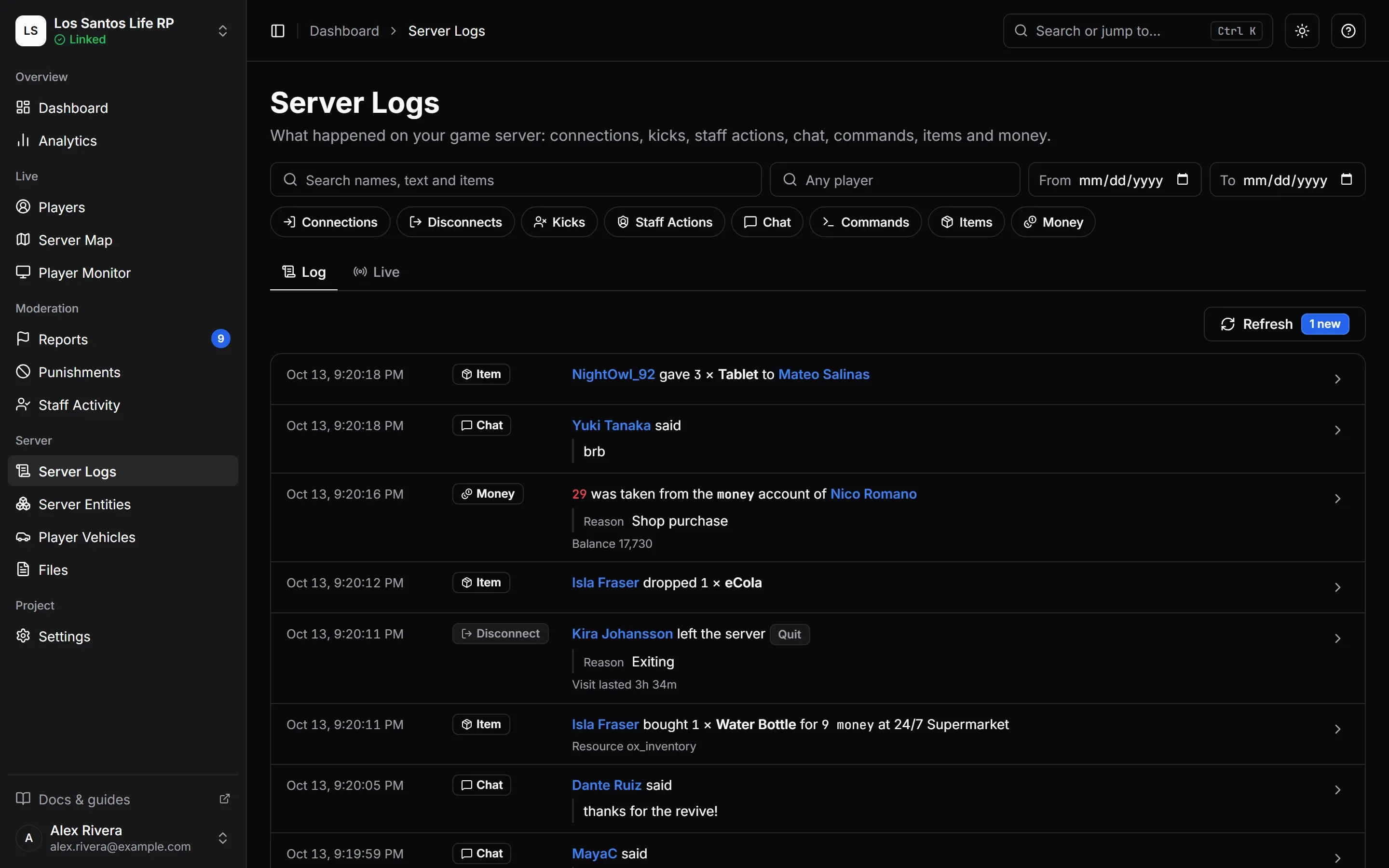
Server Logs is one timeline of what happened on your game server: who joined and left, who was kicked, what staff did, what players typed and ran, which items moved, how money changed, what players post and who they call on their phones and what your own scripts post to a webhook. Use it to answer “what happened around 9 pm?” or “what has this player been doing?”. It is the Server Logs page in the sidebar, and it needs the View Server Logs permission. The default Admin and Moderator roles have it. Support does not. It is also the permission that shows what your webhooks received, here and on each webhook’s own tabs.
The same lines for one player are on the Logs tab of their profile (see Players and Profiles), and the page is one of the pages available in the game through the Web Panel (The Panel Tab and Player Window).
What Is Logged
There are ten types of line. Each can be switched on or off for your project (see Choosing What Is Kept).
| Type | What it records | Needs |
|---|---|---|
| Connections | Players joining, and players MonoAdmin refused at the door, with the reason | |
| Disconnects | Players leaving, with how they left and how long the visit lasted | |
| Kicks | Kicks by staff through MonoAdmin and by scripts allowed to kick | |
| Staff Actions | What staff did to players and to the server, in the panel and in game | |
| Chat | What players typed in chat, including lines a mute kept from other players | A resource version that sends logs |
| Commands | Commands players ran, in resources that load MonoAdmin’s logging line, and chat commands no script handles | A resource version that sends logs |
| Items | Items given, dropped, picked up, stored, bought, crafted or added by scripts | ox_inventory |
| Money | Money in and out of every character account | ESX, QBCore or Qbox |
| Phone | Public posts and calls on the phone. Never messages, mail or DarkChat | lb-phone 2 |
| Webhooks | Lines your scripts post to a webhook in Settings > Webhooks, copied here | A webhook that something posts to |
Lines are worded as sentences, for example:
- “Juno Vex joined the server” and “Juno Vex was refused at the door”
- “Kiyoshi kicked Mara Quinn” and “my-anticheat kicked Mara Quinn”
- “Mara Quinn said …” and “Mara Quinn wrote while muted …”
- “Juno Vex ran tow” and “Juno Vex tried foo, which no script handles”
- “Juno Vex gave 3 x Water to Mara Quinn” and “Juno Vex bought Bandage for 250 at Pharmacy”
- “250 was added to the bank account of Juno Vex”
- “Juno Vex posted on Birdy” and “Juno Vex called Mara Quinn”
- “Bank robberies received bank_robbery”, with the script’s message under it
Staff Actions covers what staff did to players and the server, such as bans, warnings, heals, teleports, announcements and cleanups. Changes to your team, roles, settings, billing, webhooks, Discord and the server link are not here. They are in Audit Logs, which is the place to look for who changed what in your project. The one exception is a change to the community service area in game, which shows here as a Staff Action too. Actions from the in-game menu carry an In Game badge.
Webhook lines are copies of what your scripts post to a webhook. They name no player, and Server Logs keeps a shortened copy of each: a long message and long field values are cut there, and the webhook’s own Delivery Log keeps the whole line. See Webhooks for what a line shows and what is cut.
Reading the Log
The page has two tabs, Log and Live, and one set of filters shared by both.
Filters
- Log types are chips. Select any number of them; with none selected you see every type.
- Search names, text and items finds a word in player names, the text of a line (chat, a command, a reason) and item names. On a webhook line it also finds the webhook’s name, the event and the field values, and on a phone line the account, the title, the phone numbers and the company. Up to 64 characters, and at least 3: until you have typed three, the box says “Type at least 3 characters to search.” and the list is not searched. See Searching.
- Player limits the log to one player. A player is matched whether they did the thing or had it done to them: the one who gave and the one who received an item, the one kicked and the one who kicked. Webhook lines name no player, so they are hidden while a player is chosen.
- From and To set a range of days in your time zone. They cannot reach back past your plan’s history.
- Clear Filters resets them.
The filters are kept in the page address, so you can share a view with a teammate.
Searching
Searching for a word means reading every line of the range you chose, so MonoAdmin keeps it fair between projects:
- A search needs at least 3 characters. A shorter word would match nearly every line.
- One search runs at a time, for your project and for each person. If you ask for another while one is still running, for example by changing the word before the first has finished, the list says “Too many attempts. Try again in 2 seconds.” and the next search goes through a moment later.
- A search that would have to read too much shows Server Logs Is Not Available instead of lines. That happens with a very common word over a long range of days. Narrow the dates with From and To, or search for a longer or rarer word, and try again. Nothing is wrong with your logs.
Filtering by type or by player, without a word, is not held to any of this.
The Log Tab
The Log tab shows stored lines, newest first, a page at a time. Each line has the time, a badge for its type and a sentence, with player names linking to their profiles. Text that players typed (chat, commands, reasons) goes under the sentence as plain text. The arrow on a line opens its details: the Event, Player, Other player, Staff member, Resource and Text, plus whatever values the line carries, such as Item, Count, From, To, Price, Account, Change, Balance, Command, How they left, Visit length or Reason. A webhook line shows its Webhook, its event and message, the fields the script sent and the Format the line came in, JSON or Discord. Roles with Manage Webhooks also get an Open Webhook link to Settings > Webhooks, except in the in-game Web Panel.
A Refresh button and an “{n} new” counter show lines that arrived since the list loaded. If your range reaches further back than your plan keeps, a notice says so: “Your {plan} plan keeps {days} of logs. The range you asked for reaches further back, so older lines are left out.” See Plans and Limits.
The Live Tab
Live is a live tail: lines appear the moment they happen, while the page is open.
- Pause holds new lines back (the badge reads “Paused” and counts how many wait) and Resume shows them. Clear empties the tail.
- Only the latest 200 lines stay in the tail. The Log has them all.
- If lines come faster than the tail can show, some are skipped and counted, with a link to load them in the Log.
- Live lines follow your type, search and player filters, but ignore the date range.
- If the connection drops, the tail shows Reconnecting…, and later “Live updates were interrupted for a moment. Lines that happened meanwhile are in the Log.”
Choosing What Is Kept
You decide what Server Logs keeps. Go to Settings > Features and find the Server Logs module. You need the Edit Settings permission.
- The module switch turns the whole feature on or off. Off, it keeps no line at all.
- Under it is one switch per type: Connections, Disconnects, Kicks, Staff Actions, Chat, Commands, Items, Money, Phone and Webhooks. “A type that is off is not recorded at all; lines already kept stay until your plan stops keeping them.”
- Items shows Needs ox_inventory when your server does not run it right now. The switch is kept for when it does.
- Phone is on by default, like the other types, and shows Needs lb-phone when your server does not run lb-phone right now. The switch is kept for when it does.
- Webhooks stops only the copy. The webhooks themselves go on accepting lines and keep them in their own Delivery Log. Lines that arrive while the switch is off are not copied later.
- If your server’s resource is older than Server Logs, the screen says so: “Your server’s MonoAdmin resource is older than Server Logs, so it does not send chat, commands or items yet. Update the resource to start them.”
A game type that is switched off is not captured on your server either. The resource is told on every change, and lines already waiting to be sent are checked again before they go out. See Features and Modules.
Logging Commands With logging.lua
FiveM has no way to see the commands that scripts register. MonoAdmin can therefore log only the commands of resources that you opt in. It never loads the file itself. You add one line to the fxmanifest.lua of each resource whose commands should show up, before that resource’s own scripts:
shared_script '@monoadmin/logging.lua'It works the same way as shared_script '@ox_lib/init.lua'. The file belongs to the MonoAdmin resource, so the name after @ is the name of MonoAdmin’s folder: if you called it admin, the line is shared_script '@admin/logging.lua'. Once added, the line:
- On the server, logs each command a player runs right before it runs, with the resource’s name.
- On the client, reports commands registered on the client, at a limited rate (up to 10 at once, then 2 a second).
- Never changes, blocks or delays a command. The resource’s own handler always runs with the same arguments, and its result is returned unchanged, even if the logging fails.
- Skips the server console and commands whose names start with
+or-(key mappings, which fire on every key press). A key mapped to a command with an ordinary name does log each time it is pressed. - Checks on every call that MonoAdmin is running, under whatever name its folder has, so a framework that starts before MonoAdmin is fine. It logs nothing while MonoAdmin is stopped.
Where to Add It
Add it to the resources whose commands you care about. The framework and ox_lib register their commands from inside their own resource, so these three cover a lot:
es_extended,qb-core(qbx_coreon Qbox): the framework’s commands.ox_lib: commands scripts register throughlib.addCommand.
Those resources start before MonoAdmin, so they read the file before MonoAdmin has started. If your console says it cannot load the file, start monoadmin before that resource in server.cfg. This load order is one of the things still to be confirmed on real servers.
A script that calls RegisterCommand itself needs the line in its own manifest. Chat commands that no script handles are logged without any setup, as lines saying a player tried a command no script handles.
When Not to Add It
Skip any resource whose commands take a secret: login or PIN commands, banking codes, passwords. The line is logged with its arguments. Commands go through MonoAdmin’s own redaction of link codes and tokens, but that does not know your script’s secrets. Also think twice about a resource with a very chatty command, since each use is a line.
Scripts can also log a command themselves with one export call. See Scripts and Exports.
Items and ox_inventory
When ox_inventory runs, MonoAdmin adds four hooks to it. They only note what happened and never slow down, refuse or change an action. The lines cover:
- Moves between two different inventories, worded by where the items went: a drop, a pick up from the ground, a stash or police evidence, a trunk or glovebox, a player giving to another player, or something else such as a bag. A swap also logs the stack that went back.
- Purchases, with the item, count, total price, currency and shop.
- Crafting, with the item, count and bench.
- Items another resource adds to a player’s inventory, named with the resource.
Treat item lines as a record of what players tried to do, not a ledger. ox_inventory has no hook for taking an item away, so an item a script removes is not a line. The hooks run before the action, so a move that is logged can still be cancelled by another resource or by ox_inventory itself, for example when the inventory is full.
Phone and lb-phone
When lb-phone 2 runs, the resource also listens for what lb-phone reports about two things: public posts and calls. A post is “{player} posted on {app}”, with the post’s text under it. A call is “{player} called {callee}”, with who called whom or which company, how long it lasted, whether it was answered and whether it was a video call.
| Line | Where | What it records |
|---|---|---|
| Post | Birdy, InstaPic, Trendy, Pages and Marketplace | The text of the post, or the description of a listing, with the account or the title, price and number. Posts from private Birdy accounts are not logged |
| Call | Voice and video calls | Who called whom, or which company, how long, answered or not, and video or not |
The Phone type never records private messages, mail or DarkChat, and never pictures, videos or links. Staff see the numbers of a call even when the caller hid theirs from the person they called. See Phone Scripts.
When MonoAdmin Cannot Be Reached
Chat, command, item and phone lines are sent from your server in small batches every couple of seconds. While your server is not connected to MonoAdmin, those lines are dropped and not saved for later, so a gap in the log can mean your server was offline from MonoAdmin’s point of view. Separately, if MonoAdmin’s log store cannot be reached, the page shows Server Logs Is Not Available and asks you to try again in a moment. The rest of MonoAdmin keeps working. The same notice appears when a search would have to read too many lines (see Searching); then narrowing the dates is the fix, not waiting.
How Long Lines Are Kept
You can read lines as far back as your plan’s history. See Plans and Limits and Data, Privacy and Retention.