Characters and Owned Vehicles
View and edit a character's identity, job, gang, money, position, inventory and metadata, and manage owned vehicles on ESX, QBCore and Qbox.
On This Page
On ESX, QBCore and Qbox, a player’s characters and the vehicles they own live in your framework’s database. MonoAdmin reads that data through the resource on your server and lets staff change it from the panel: fix a typo in a name, set a job, move a stuck character, return an impounded car.
None of this exists on a Standalone server, because there is no framework database to read. It also needs oxmysql; mysql-async and ghmattimysql are detected but are not enough. See Supported Frameworks and Requirements.
The Character Tab
Open a player’s profile and choose Character. The tab appears when your role includes View Character Data and the server supports character data. The data is read live from your server’s database each time, so the Refresh button re-reads it.
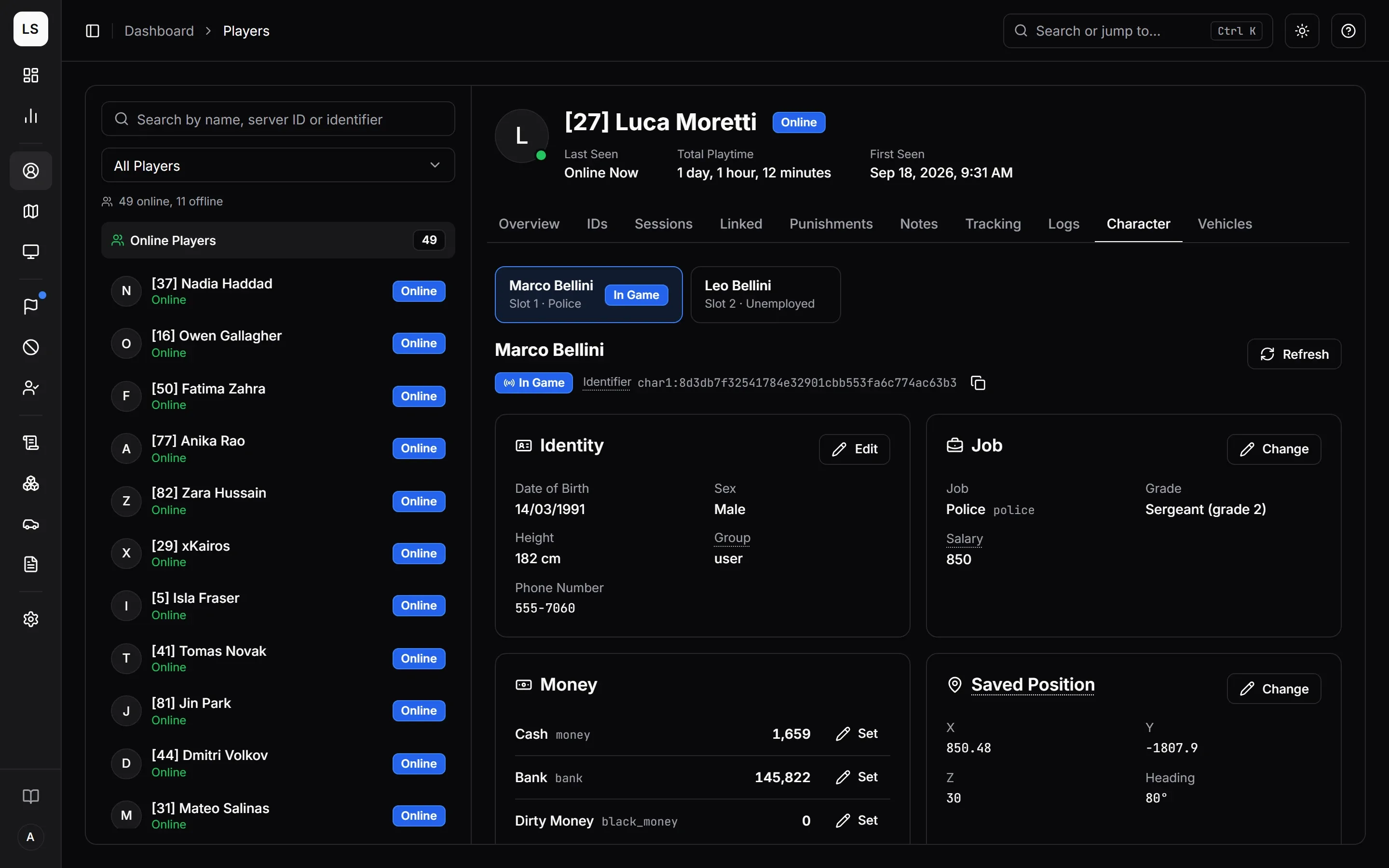
If the player has more than one character, a row of buttons at the top lets you choose which to look at. Each shows the character’s name, slot (Main character or Slot 2 and so on) and job, and a character that is loaded in game right now is marked In Game.
The header of the card names the character and shows two things worth knowing:
- In Game or Not Loaded. A character that is loaded in game has changes applied at once through the framework. One that is not loaded has changes saved straight to the database, and it picks them up the next time it loads.
- Its identifier. On ESX that is the Identifier, made from the slot and the player’s license. On QBCore and Qbox it is the Citizen ID, which stays the same for the life of the character. Both have a copy button.
What You Can Read and Change
Each card has its own edit button, shown only if your role holds the matching permission. Every edit opens a dialog that states what will change and whether it applies at once or when the character next loads, then asks you to Review Change and confirm.
| Card | Shows | Edit with |
|---|---|---|
| Identity | Date of birth, sex, height or nationality, and on ESX the permission group; the phone number when one exists. | Edit Character; Reset Phone Lock for the phone’s lock |
| Job | Job, grade, duty status and salary. | Edit Job |
| Gang (QBCore and Qbox) | Gang and grade, or “No gang”. | Edit Gang |
| Money | Every account the character has. | Edit Character |
| Saved Position | X, Y, Z and heading. | Edit Position |
| Memberships (Qbox) | Every job and gang the character belongs to. Read only. | Not editable |
| Inventory | Items, with a search box once there are many. | Edit Inventory |
| Metadata | The extra values scripts keep on the character, such as hunger or thirst. | Edit Metadata |
The Inventory card appears only when your server supports inventory editing for your framework and inventory resource. See Inventory Resources.
Identity
- First Name and Last Name take letters, spaces, apostrophes, hyphens and dots, up to 32 characters each.
- Date of Birth is free text on ESX, written as your server stores it, such as
1990-04-12or12/04/1990. On QBCore and Qbox it must be a real date writtenYYYY-MM-DD. - Sex is Male or Female.
- Height (cm) is ESX only, between 100 and 250.
- Nationality is QBCore and Qbox only, up to 32 letters.
The permission group, phone number and dead status are shown for reference and cannot be edited here.
Phone Number and Reset Lock
When your server runs lb-phone 2, the Phone Number is lb-phone’s own: the number of the phone the character has equipped. lb-phone never writes your framework’s phone field, so that field goes stale, and MonoAdmin shows lb-phone’s number instead. A character with no phone shows no phone row.
Beside the number, a Reset Lock button clears the PIN and Face ID of that phone, online or offline, for a player who forgot the PIN. It needs the Reset Phone Lock permission, and the confirmation says “Clears the PIN and Face ID of phone {number}. Whoever holds this phone can open it until a new lock is set.” See Phone Scripts.
Job and Gang
Pick the job (or gang) from the list your server reports, or type its name if the list could not be loaded, and a grade from 0 to 100. Names are letters, digits and underscores. On QBCore and Qbox, the gang none means no gang. A refusal from the server, for example because the job or grade does not exist there, is shown in words.
Duty status is shown but never changed: players switch it in game.
Money
Press Set on an account to type a new balance, from 0 to 1,000,000,000. The new amount replaces the current one; nothing is added to it. The dialog shows “Now 5,000; it becomes 7,500” before you confirm.
Changes made here are recorded as made by staff, so Analytics can tell them apart from money earned in game. To add or take an amount from an online player instead, use Give $ and Take $ in Player Actions.
Position
Enter X and Y from -20,000 to 20,000, Z from -1,000 to 5,000, and a heading from 0 to 360 degrees. An online character is moved there at once. An offline one appears there the next time it loads.
Inventory
- Add Item lets you search the server’s item list and set an amount from 1 to 100,000. If the character already holds some, the amount is set to your number rather than added to it.
- Change the amount of a row to a new number, or to 0 to remove the item.
- On inventories with slots, each row shows its slot.
If the item does not exist on your server, or the inventory is full, the server refuses and the message says why.
Metadata
Each entry is a key and a value. A key is letters, digits and underscores, up to 64 characters. A value is JSON, up to 4 KB: a number like 75, text in double quotes like "calm", true or false, or an object. You can add, change and remove values.
Differences by Framework
| ESX | QBCore | Qbox | |
|---|---|---|---|
| Identifier shown | Identifier (slot and license) | Citizen ID | Citizen ID |
| Date of birth | Free text | YYYY-MM-DD |
YYYY-MM-DD |
| Height | Yes | No | No |
| Nationality | No | Yes | Yes |
| Permission group | Shown | No | No |
| Gang | No | Yes | Yes |
| Memberships | No | No | Yes, read only |
All of these edits are recorded in Audit Logs. Turning the Character Editing feature off in Settings > Features withholds the identity, money, gang, position, metadata, inventory and Reset Phone Lock permissions from everyone; Jobs governs Edit Job.
The Player Vehicles Page
Player Vehicles in the sidebar lists the vehicles your players own across the whole server. It needs View Owned Vehicles and a framework with an owned-vehicles table (ESX, QBCore or Qbox). A player’s profile has a Vehicles tab with the same list narrowed to that player.
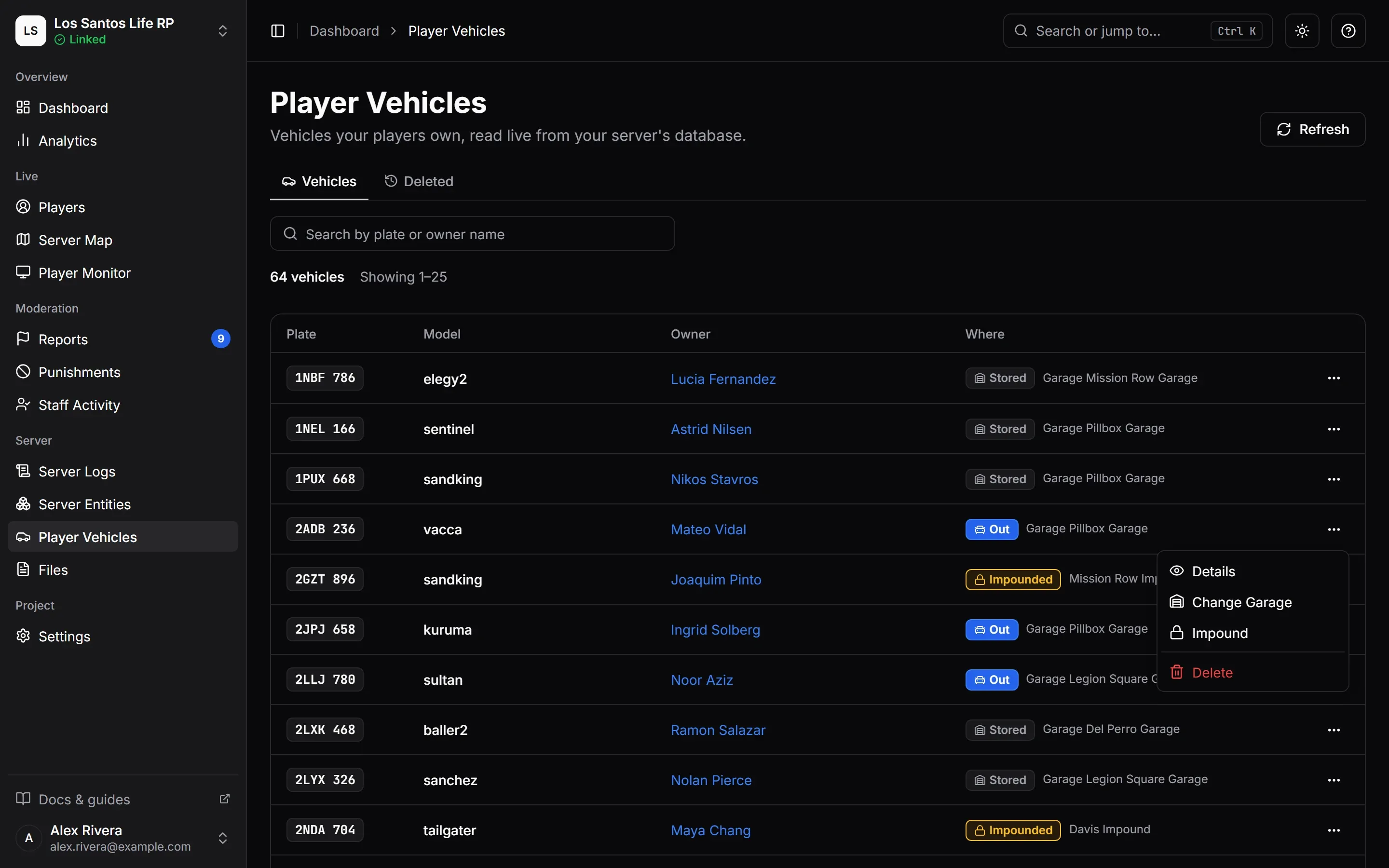
The page has two tabs: Vehicles and Deleted.
The Vehicles Tab
- Search by plate or owner name, up to 32 characters. Results come 25 to a page.
- Each row shows the Plate, Model, Owner and Where. The owner appears as a character name; a vehicle whose owner has no MonoAdmin player yet shows the owner’s identifier instead. With jg-advancedgarages, a nickname shows under the plate, and a job or gang vehicle reads Job: police or Gang: ballas.
- Where is one of Stored (in its garage, shown with the garage name), Out (taken out and not put back), Impounded (at an impound lot until staff or a script releases it) and, on QBCore and Qbox, At Depot (the owner pays a fee to take it out).
- Refresh reads the list again. The list is read from the game server on demand, so the page needs the server online.
Open a row’s menu for the actions your role allows:
| Action | Needs | What it does |
|---|---|---|
| Details | View Owned Vehicles | Shows owner, fuel, engine and body health out of 1000, garage, impound lot, depot fee, type, job and the saved properties (the look and tuning). |
| Change Garage | Edit Owned Vehicles | Changes the garage name and whether the vehicle is stored there. A copy currently out in the world is not moved. |
| Impound | Impound Vehicles | Moves the vehicle to an impound lot you name. On QBCore and Qbox you also set a depot price, where 0 is free. The owner cannot take it out meanwhile. |
| Release | Impound Vehicles | Takes a vehicle out of the lot and stores it. On ESX it is a plain confirmation. On QBCore and Qbox you choose the garage it goes to, and it stays stored there with no depot fee. |
| Delete | Delete Owned Vehicles | Removes the vehicle from the owner’s vehicles, after a confirmation that names the plate, model and owner. |
Garage and lot names must match exactly how your garage script writes them, for example pillboxgarage. Use letters, digits, spaces and these marks: . , : ’ ( ) & # + / - _
With jg-advancedgarages
On a server that runs jg-advancedgarages v3, the Vehicles page reads and writes jg’s own record of each car, on ESX, QBCore and Qbox alike, instead of your framework’s garage fields. What changes:
- Where follows jg: Stored is in its garage, Impounded is in one of jg’s impound lots.
- Change Garage, Impound and Release let you pick from the garages and impound lots jg lists, instead of typing a name.
- Impound takes an optional Reason (up to 128 characters, which the owner sees in jg’s garage) and a Retrieval Cost, which is what the owner pays to take the car out of the impound. The cost is set on ESX too, where the page otherwise has no impound fee. A car that is already impounded is refused.
- Release lets you leave the garage empty to send the car back to the garage it was impounded from.
- Details shows the Nickname, the Gang, the Impound Reason and Impounded By, which reads Server staff for an impound made from MonoAdmin, and Retrieval Cost in place of Depot Fee.
- Change Garage is refused while the car is impounded (release it first) and, for a change of its stored state, while it is out in the world.
- Deleting a car in the world puts an owned car back in its garage.
Garage Scripts has the details and the limits. jg v4 is shown but not changed.
Deleting and Restoring
A delete is not final. MonoAdmin keeps a full backup of the vehicle for 60 days. Right after you delete one, a banner offers Restore Now or View Deleted.
The Deleted tab lists the backups, who deleted each and when, and has an exact-plate filter. Restore puts the vehicle back in your database exactly as it was, owned by the same character. A backup can be restored once, and only while the game server is online. If a vehicle with that plate exists again, the restore is refused until you delete or rename that vehicle. Deleted vehicles can still be browsed while the server is offline.
Vehicle changes are recorded in Audit Logs too.