Sticky Bans and Linked Accounts
How MonoAdmin links a player's other accounts by shared identifiers and hardware tokens, and how a sticky ban follows them.
On This Page
A ban that matches one account is easy to dodge: make a new account and walk back in. A sticky ban recognizes the person behind the account by what their accounts share. It blocks the banned account, every account MonoAdmin has linked to it with confidence, and anything new the person turns up with when they try to return.
This page explains what is compared, how accounts become linked, and how a sticky ban grows. For a short walkthrough with an example, read How Sticky Bans Catch Alt Accounts.
Two Modes
Every ban has a mode, shown as a Sticky badge on the Punishments page.
| Mode | What it blocks |
|---|---|
| Sticky | Every identifier and hardware token of the banned player, the same for every linked account with a confidence of 70 or more, and whatever new identifiers a returning evader brings. |
| Not sticky | Only the player’s own account identifiers. Hardware tokens are not used. |
Only bans can be sticky. Warnings, kicks, mutes and community service always follow the player’s own accounts.
You choose the mode per ban with the Sticky ban checkbox in the Issue Punishment dialog. The checkbox starts according to the project’s Default ban, set under Settings > Overview as either “Sticky: also block linked accounts” or “Not sticky: only this player”. New projects start on Sticky. Bans that a trusted script issues follow the default too, because the script has no checkbox to tick.
What MonoAdmin Compares
When a player connects, FiveM reports the identifiers it knows for them. MonoAdmin compares two kinds of evidence.
Account Identifiers
| Identifier | What it is |
|---|---|
| license and license 2 | The player’s Rockstar license, the most stable identifier. |
| Steam | Their Steam account. |
| Discord | Their Discord account, when FiveM can read it as they connect. |
| Cfx.re | Their Cfx.re (FiveM) account. |
| Microsoft Live and Xbox Live | Their Microsoft or Xbox account. |
Hardware Tokens
A hardware token comes from the player’s machine instead of an account. It survives a new Steam or Discord account, which is why it helps. But one token alone proves little: some are shared by many unrelated players. MonoAdmin therefore wants at least two matching tokens before it treats a connection as the same machine.
What Is Never Used
IP addresses are never used to identify or link players. MonoAdmin stores the address of each visit, and staff with the View Player IPs permission can read it on the Sessions tab, but it plays no part in links or bans. An address is shared by too many unrelated players to be a safe signal.
How Accounts Become Linked
Each time a player joins, MonoAdmin looks for other players of the same project who have been seen with any of the same identifiers or tokens. Every match becomes a link with a confidence from 1 to 100. The strongest evidence sets the number.
| What the two accounts share | Confidence | Label in the panel |
|---|---|---|
| A Rockstar license | 100 | Same person |
| A Steam, Discord, Cfx.re, Microsoft Live or Xbox Live account | 90 | Very likely |
| Three or more hardware tokens | 85 | Very likely |
| Two hardware tokens | 70 | Very likely |
| One hardware token | 35 | Possible |
Links exist only inside one project. A link is formed when the second account joins, so an account that has never connected has no links.
The Linked Tab
Open a player’s profile and choose Linked (it needs View Linked Accounts). Each row shows the other account, which kinds of identifier are shared, when it was last seen, and the label with its percentage. The kinds are shown, such as “Shared: Discord, hardware tokens”, but not their values. Click a name to open that profile.
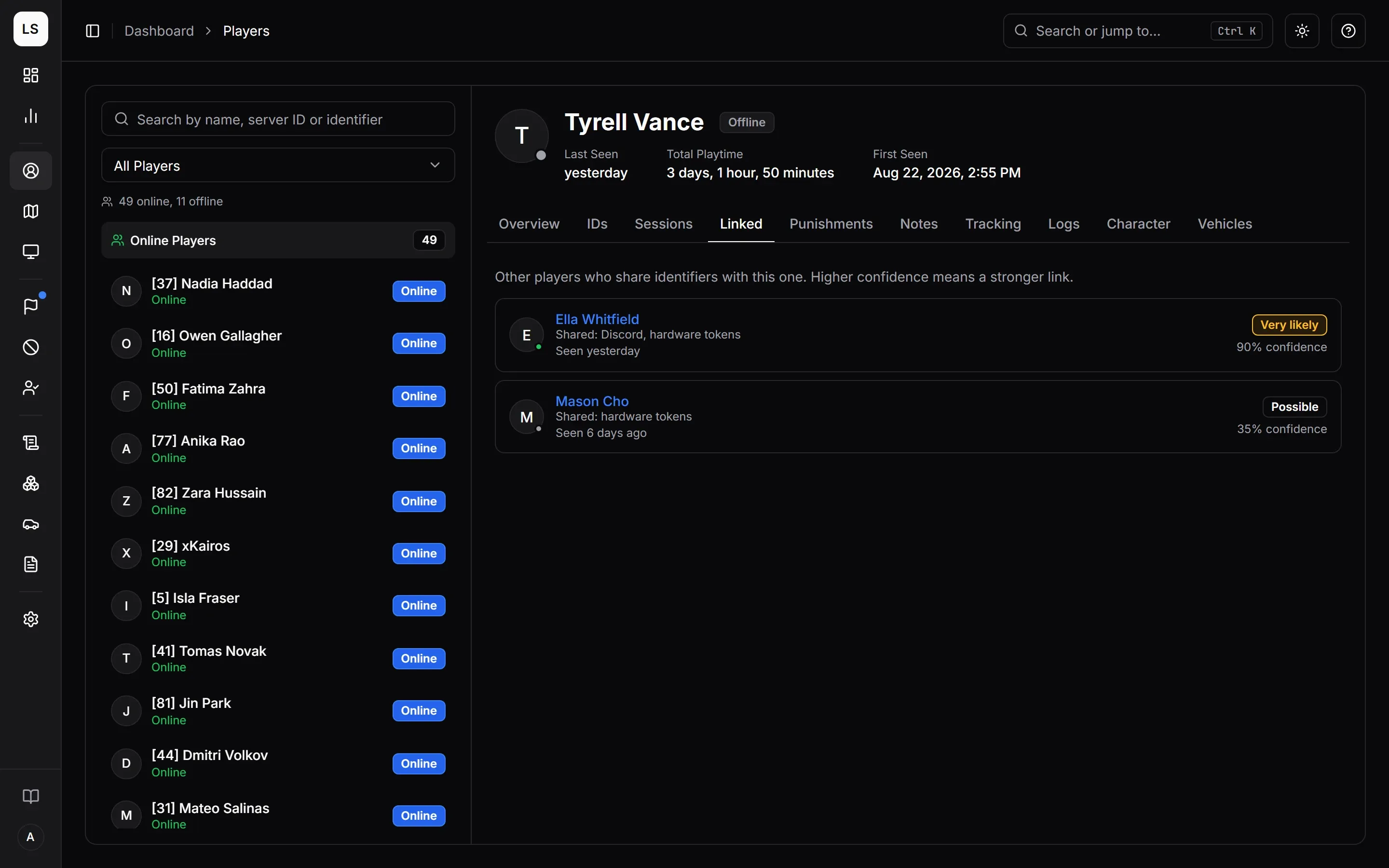
Hover the percentage for a reminder of how confident MonoAdmin is. With no links, the tab says No Linked Accounts.
What a Sticky Ban Collects
When you issue a sticky ban, MonoAdmin gathers:
- every identifier and hardware token recorded for the banned player, and
- the same for every linked account with a confidence of 70 or more.
A shared account identifier is enough to qualify (90 or 100). A single shared hardware token (35) is not, but two or more are.
All of it goes on the ban, up to a ceiling of 256 entries so a ban cannot grow forever, and the ban is pushed to your game server. A ban that is not sticky takes only the player’s account identifiers.
How a Match Works
When someone connects, your server checks its local copy of every ban. A connection counts as banned when it shares any one identifier with a ban, or at least two hardware tokens. A match is refused on the spot with the reason and end date. The whole door check, including what happens when MonoAdmin is unreachable, is in How Bans Are Enforced.
Players who are already online and match a new sticky ban are removed at once. That includes other accounts of the same person: the toast says how many players were removed.
How a Sticky Ban Grows
Even when your server’s local copy has already refused someone, it still tells MonoAdmin who knocked. For a sticky ban, MonoAdmin adds every identifier and hardware token that person arrived with to the ban and pushes the update to your server.
For example, a banned player comes back on a new Steam account but the same Discord. The Discord ID matches, so they are refused, and the ban now also holds the new Steam ID. Later they try again with yet another Discord account but that same new Steam account. The Steam ID is on the ban now, so they are caught again.
A refused connection never becomes a player in your list, so it does not create new links of its own. All it does is feed the ban.
What It Cannot Catch
- A sticky ban learns only from attempts it catches. An account that shares nothing with what the ban holds looks like a brand new player, and nothing can recognize it. A fresh Rockstar license, Steam account, Discord account and a different computer is a different person as far as MonoAdmin can tell.
- One shared hardware token is not enough, by design.
- A ban grows only while the server is linked. If your server cannot reach MonoAdmin, the local copy still refuses what it knows, but it cannot teach the ban anything new until the connection returns.
- The ceiling is 256 entries. Once a ban is full, it stops learning.
Getting It Right
- Pick the default. Under Settings > Overview, decide whether Default ban is sticky. Most communities leave it on Sticky.
- Check before you ban. If you are unsure the player is who you think, look at the Linked tab first.
- Give a reason players can understand. The player reads it. See Punishments.
- Correct mistakes with a revoke. If someone was caught by mistake, revoke the ban with a reason. A revoked sticky ban stops blocking every account it held. Revoking needs the Revoke Punishments permission.
- Limit who can ban. Give Ban, Revoke Punishments and View Linked Accounts only to staff who should have them. See Roles and Permissions.
Which identifier kinds were involved in a link is visible to staff with View Linked Accounts. The identifier values themselves are visible on a profile’s IDs tab to anyone who can open the profile.