What Is MonoAdmin
What MonoAdmin is and how its three parts fit together: the cloud panel, the resource on your FiveM server and the in-game menu.
On This Page
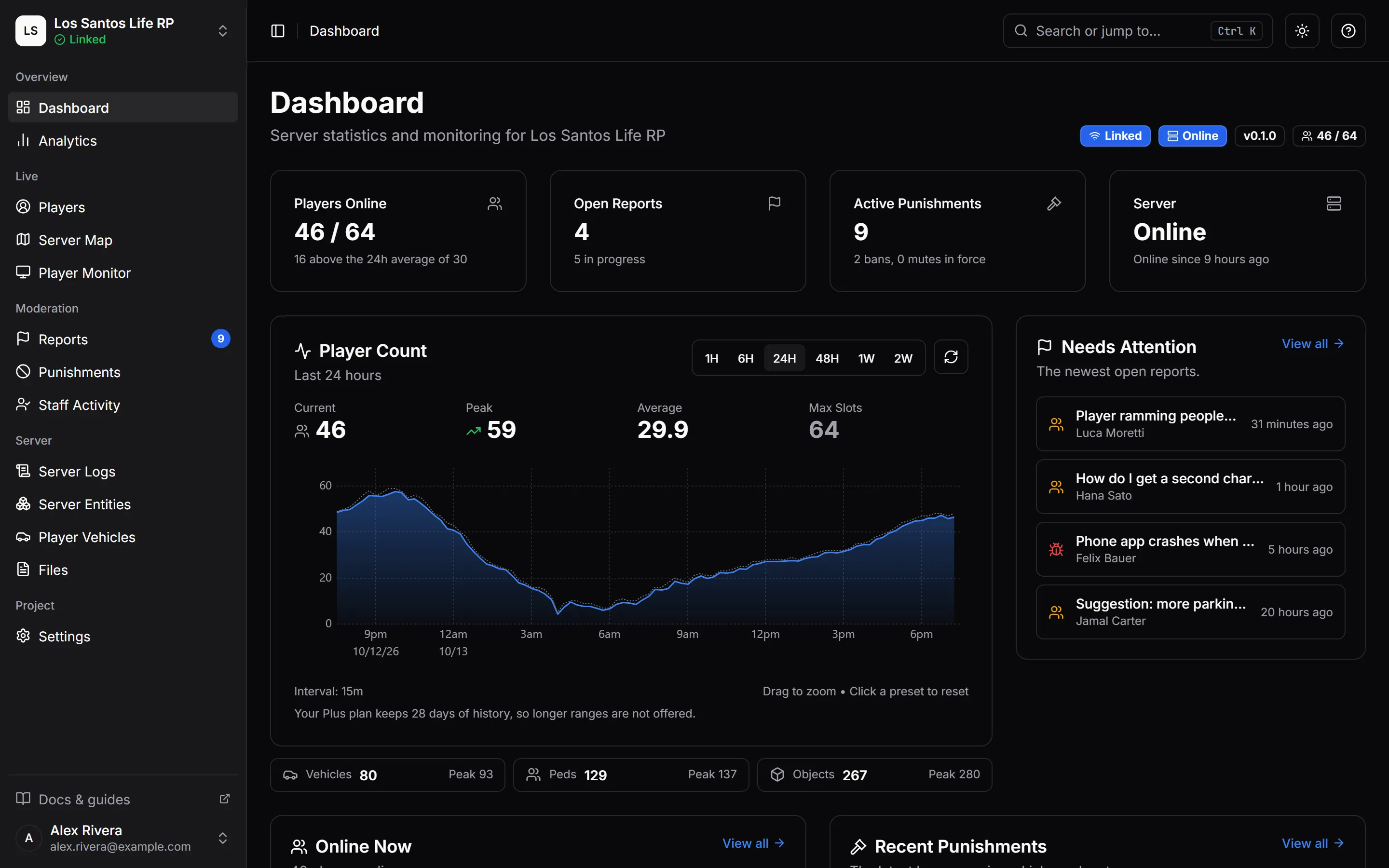
MonoAdmin is a cloud admin platform for FiveM servers. You moderate and manage your community from a web panel, your staff can do the same from inside the game, and a small resource on your game server keeps the two connected. This page explains what each part does and how they fit together, so the rest of the documentation makes sense.
The Three Parts
The Cloud Panel
The panel is a website you sign in to with your own account. It holds everything about your community: players and their profiles, punishments, reports, the live server map, the Player Monitor, analytics, Server Logs, your team and its roles, and the project’s settings.
Nothing in the panel is installed on your own machine. Every member of your team signs in with their own account, and the role you give them decides what they see and what they can do.
The Resource
The resource is a folder named monoadmin that you put in your server’s resources folder and start from server.cfg. It is the only thing MonoAdmin adds to your game server. It does five jobs:
- Keeps the connection to the cloud, and reconnects by itself when the connection drops.
- Carries out actions from the panel, such as a kick, a heal, a teleport or a screenshot, and reports back what it verified.
- Keeps a local copy of every ban, mute and community service order, so joining players are checked even when the cloud cannot be reached.
- Reads and changes framework data, such as jobs, money, items and characters, through your framework’s own functions.
- Adds the in-game menu and the report window for players, opened with
/reportunless you pick another command.
There is no configuration file. Everything the resource needs to know comes from the panel. See Install the Resource.
The In-Game Menu
The in-game menu lets staff work without leaving the game. They open it with /madmin or with a key you choose, and it has three tabs: Self (noclip, freecam, teleport, vehicles, healing, announcements), Panel (a players sheet, reports and the panel’s own pages) and Settings (how the menu looks for them).
The menu is off until the project owner switches it on, and it opens only for staff whose game account is linked to their MonoAdmin account and whose role includes Open the In-Game Menu. See Turn On and Open the Menu.
How the Parts Connect
- A project is one FiveM server. You create a project in the panel, and the resource on your server links to it with a one-time code. Each project has its own team, roles, settings and plan.
- The link only goes outward. Your server opens a connection to MonoAdmin’s gateway. Nothing connects into your server, so there is no port to open and no firewall rule to add for inbound traffic.
- The credential stays on your server. After linking, the resource keeps its credential in the server’s own key-value storage (KVP). It is never a convar and never a file you edit.
- The cloud sends a fixed set of commands. Heal, kick, announce, screenshot and the like are validated messages from a closed list, not scripts. The resource checks each one and answers with what it actually saw happen.
- Players’ own games connect too. Each player’s game opens a second connection to MonoAdmin for live position and health, and to set up Player Monitor streams. It carries telemetry only, never commands.
- Roles decide, every time. In the panel and in game, MonoAdmin checks the member’s role on every action. There are no ACE permissions to set up.
How MonoAdmin Is Secured covers this in more depth.
What You Can Do With It
| Area | What it gives you |
|---|---|
| Players | A profile for everyone who has joined: identifiers, sessions, linked accounts, staff notes, tracking and logs |
| Punishments | Ban, kick, warn, mute by voice or text, and community service, each with a reason |
| Sticky bans | Bans that follow a player’s other accounts |
| Reports | Player reports from /report, staff-written reports and Discord tickets in one place |
| Server map | Live positions on the GTA map, and a replay of where a player went |
| Player Monitor | Live player screens side by side, and screenshots as evidence |
| Characters and vehicles | Edit a character’s job, money, inventory and owned vehicles (ESX, QBCore, Qbox) |
| Analytics and Server Logs | Charts of what your server does, and a searchable timeline of what happened |
| Team | Invitations, roles with fine-grained permissions, staff activity and an audit log |
What Still Works When the Cloud Is Unreachable
Moderation does not depend on the cloud being up. Your server keeps its own copy of every ban, mute and community service order and checks each joining player against it first. If you would rather refuse everyone while MonoAdmin cannot be reached, you can turn on the fail-closed setting. How Bans Are Enforced explains both.
Actions that start in the panel, such as a heal or a screenshot, need the link to be up. The panel tells you when the server is offline.
Frameworks and Plans
MonoAdmin works with ESX, QBCore, Qbox and servers with no framework at all (standalone). The framework decides how much of your players’ data MonoAdmin can read and change; see Supported Frameworks.
Every project starts on the free Starter plan. Paid plans raise limits such as how many players can be online and how many days of history you can see. The numbers are on Plans and Limits, and prices are on the pricing page.
What MonoAdmin Is Not
MonoAdmin does not start, stop or update your server, and it has no remote console or file manager for your server’s files (the Files page holds screenshots and report attachments). There is no public API for your own tools. Your scripts can send log lines to MonoAdmin through webhooks and can punish through exports. The FAQ lists what is not supported.
Where to Start
- Check Requirements.
- Create your account and project.
- Install the resource on your server.
- Link your server with a one-time code.
- Walk through the guided setup to choose your features, menu key and team.
The whole thing takes about five minutes. In a hurry? Quick Install is the short version.